Meowbert is an AI agent server you run yourself.

You describe a job. An agent works on it in its own sandbox for as long as it needs, a second agent reviews the result, and you get a message when it's done. It runs on your hardware, with the model you choose, for you alone or for a whole team.

Free and open source under AGPL-3.0. No telemetry.

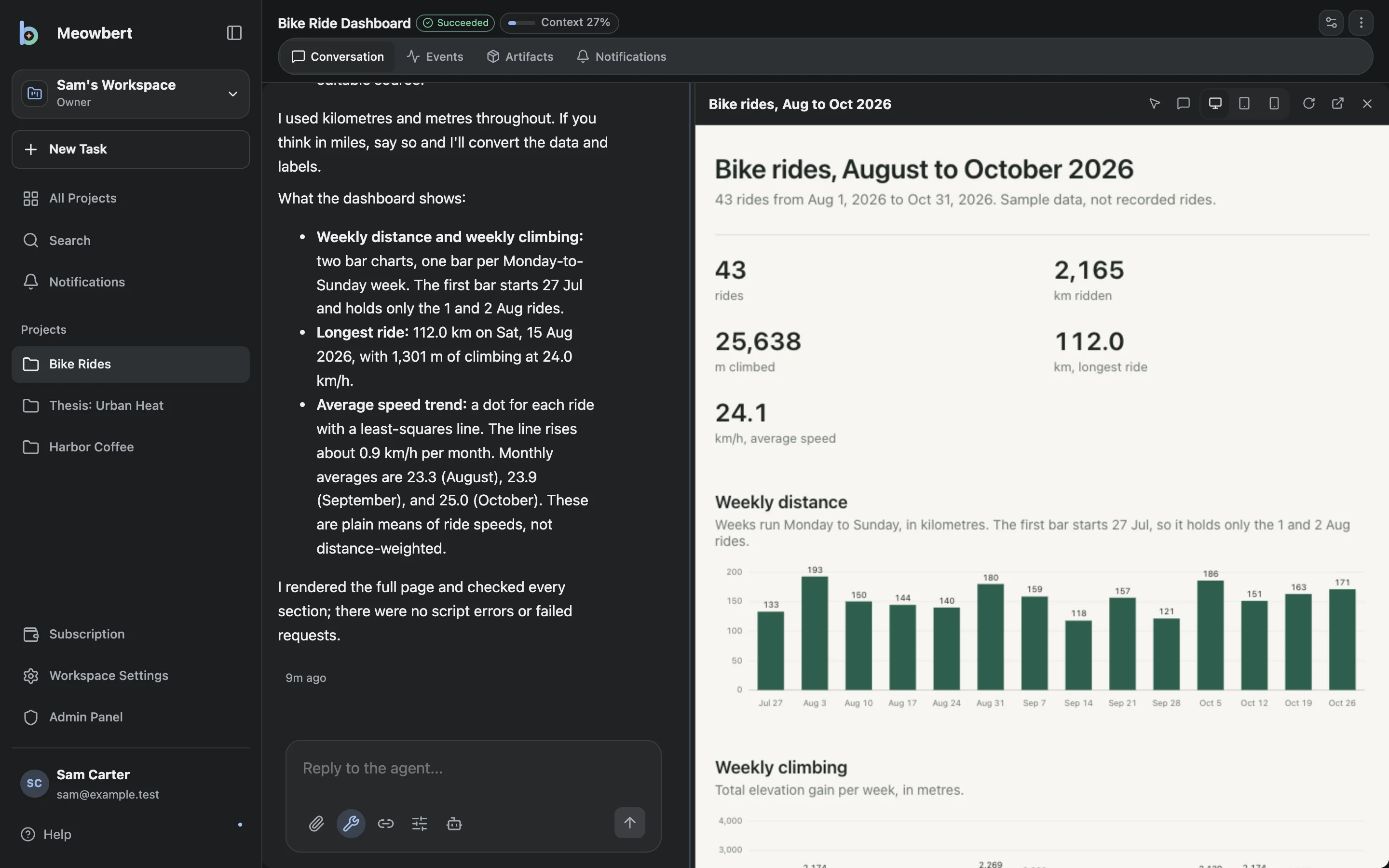
A Meowbert task that built a bike ride dashboard: the agent's reply on the left, and the finished dashboard with ride totals and a weekly distance chart open in the Canvas panel on the right.

The same request in a chat and in Meowbert

The request

There are 380 papers in my Drive folder "Lit review". Make a spreadsheet with each paper's method, sample size and main finding, and flag any papers that contradict each other.

In a chat window

I can read a few files per message. Upload the PDFs and I'll go through them in batches.

paper_001.pdf to paper_010.pdf Batch 1 of 38.
PaperMethodn
Alvarez 2021RCT340
Brandt 2018Cohort2,105

You copy each table into your own spreadsheet.

paper_021.pdf to paper_030.pdf Batch 3 of 38.
PaperDesignSample
Okafor 2019Survey1,200
Park 2020Interviews32

The columns have changed names, and Okafor 2019 reports 120, not 1,200. Nobody notices.

paper_081.pdf to paper_090.pdf Batch 9 of 38. Next one.

29 batches to go. The contradictions haven't been looked at yet.

In Meowbert

Lit review table Agent Swarm

Started Lit review table as an Agent Swarm with 6 lanes. I'll message you when it's been reviewed.

You close the laptop.

  • ✓ Read 380 PDFs from Drive / Lit review
  • ✓ $ python extract_text.py 380 files, 0 errors
  • ✓ 6 lanes started, about 63 papers each

Reviewer: changes requested

Row 212 says n = 1,200. The Okafor 2019 paper reports 120.

  • ↻ Lane 4 rechecking its 63 rows

Reviewer: approved

380 rows. 7 contradicting pairs flagged. 3 rows corrected.

Telegram 23:41

Lit review table is ready. 380 papers, 7 contradicting pairs flagged, 3 rows corrected in review. It's saved to your Drive folder as summary.xlsx.

With a chat, you stay and check every answer. With Meowbert, you can leave, and a reviewer checks the work before it reaches you.

An example run. Names, times and numbers are illustrative.
Examples

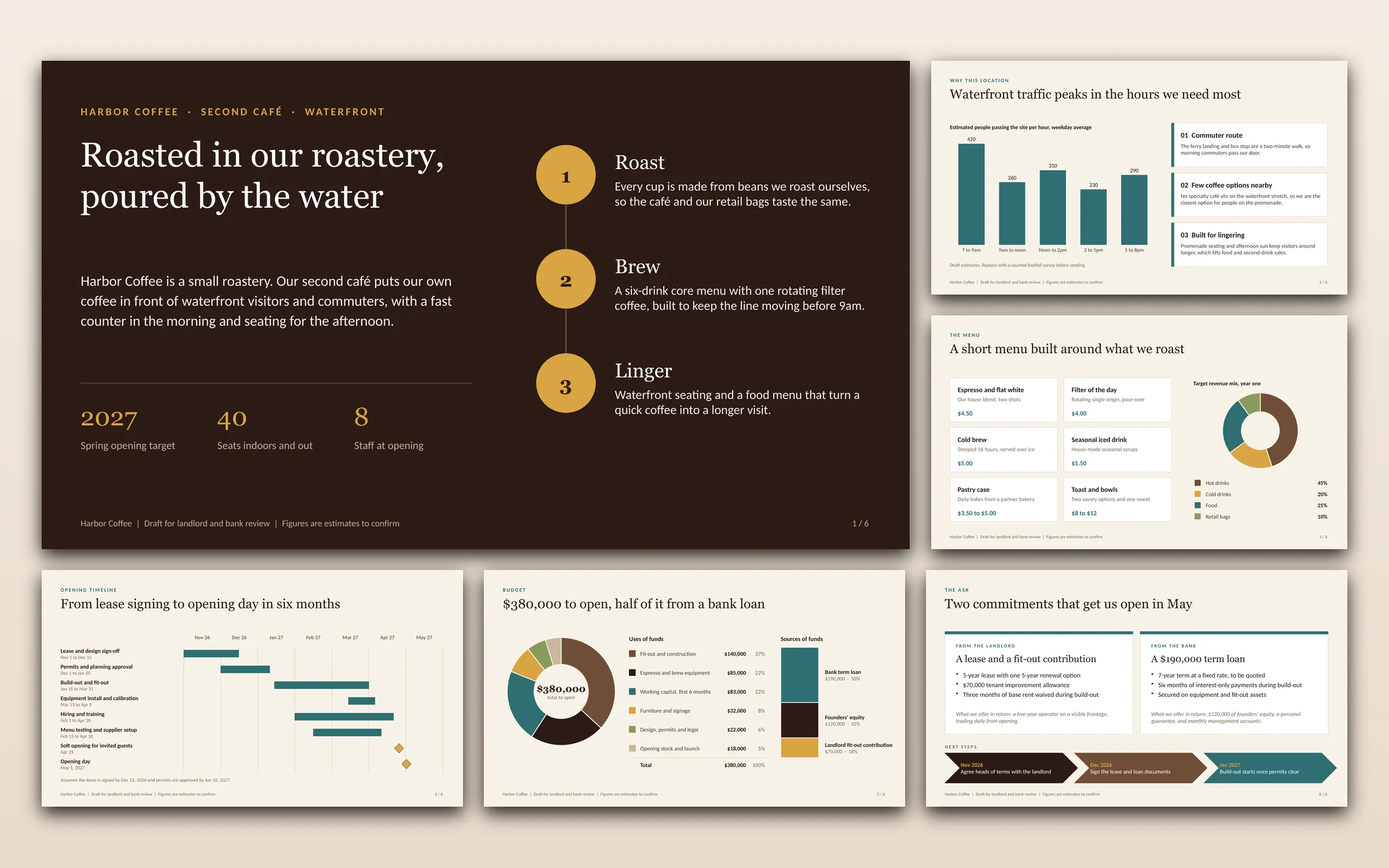
Three requests on a fresh install, each sent once with Claude Haiku 5.5. The files are shown as the agent produced them.

PowerPoint

Draft a 6-slide PowerPoint pitch for our landlord and local bank: the concept, why the location works, the menu, the opening timeline, the budget, and what we're asking for.

Six slides with charts and speaker notes, in about 4 minutes.

All six slides of a generated pitch deck for Harbor Coffee: a dark cover slide, a footfall bar chart, a menu with a revenue doughnut, an opening timeline, a budget breakdown, and the ask to the landlord and bank.

Word

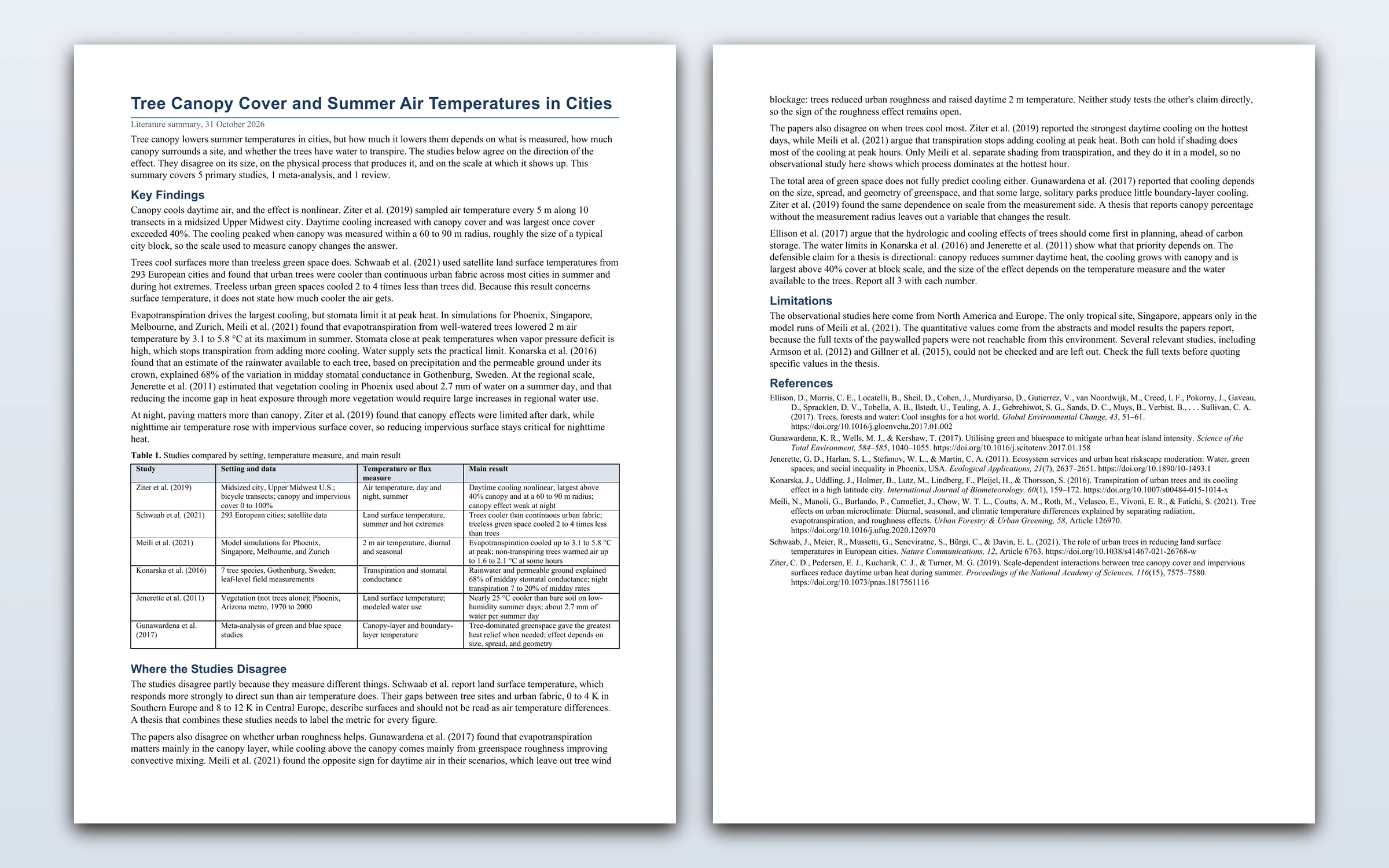
Find credible published studies on how tree canopy cover affects summer temperatures in cities, and write a two-page literature summary as a Word document: key findings, where studies disagree, and a references list.

Two pages with a comparison table of six studies and seven references with DOIs, in about 12 minutes.

Both pages of a generated Word literature summary on tree canopy and urban summer temperatures, with key findings, a table comparing six studies, and a references list.

Canvas

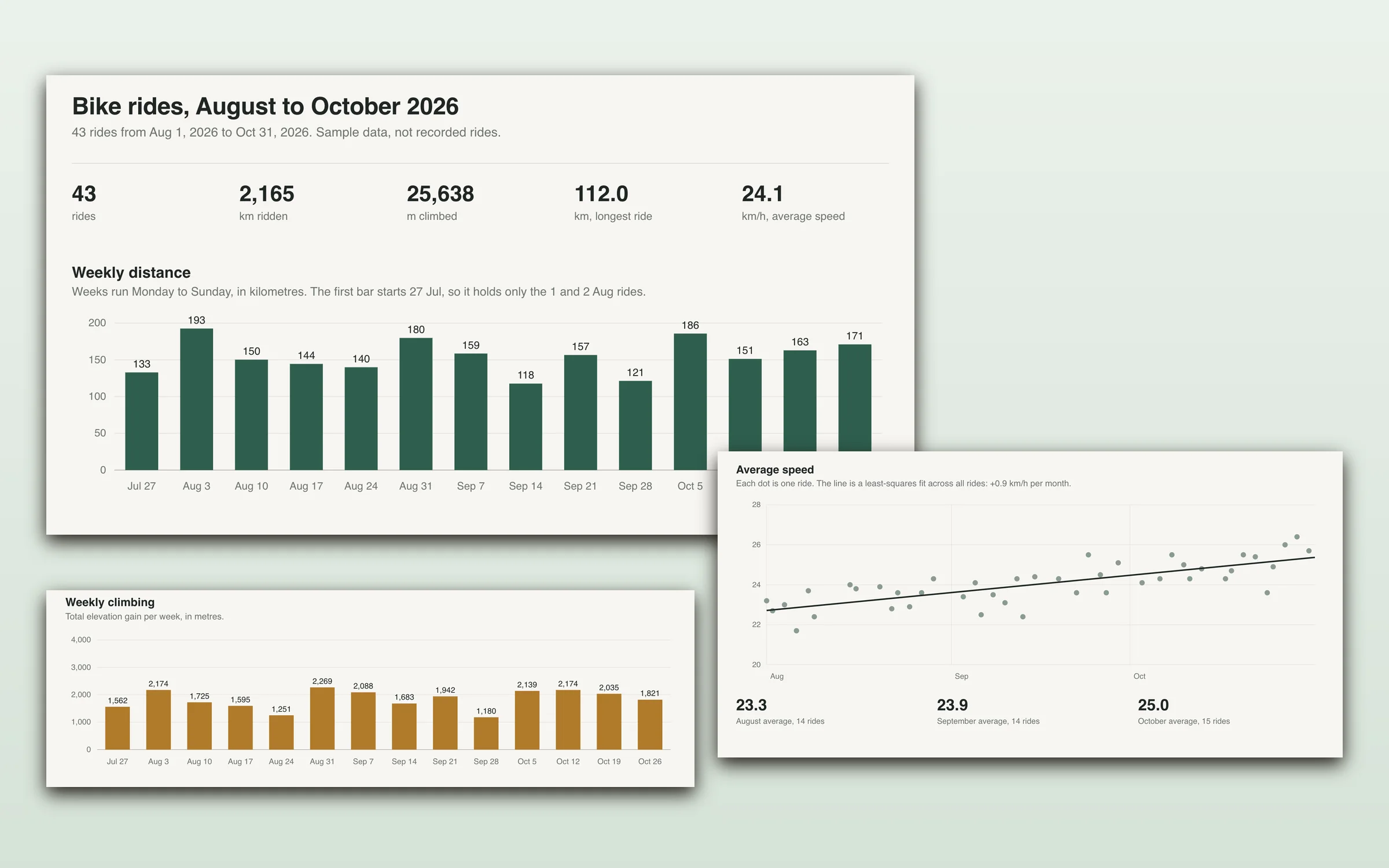
Make a CSV of three months of my bike rides, then build me a Canvas dashboard of it: weekly distance and climbing, my longest ride, and how my average speed is trending.

A CSV of 43 rides and a live dashboard, in about 3 minutes.

A generated bike ride dashboard: ride totals, weekly distance and weekly climbing bar charts, and an average speed scatter plot with a rising trend line.

Features

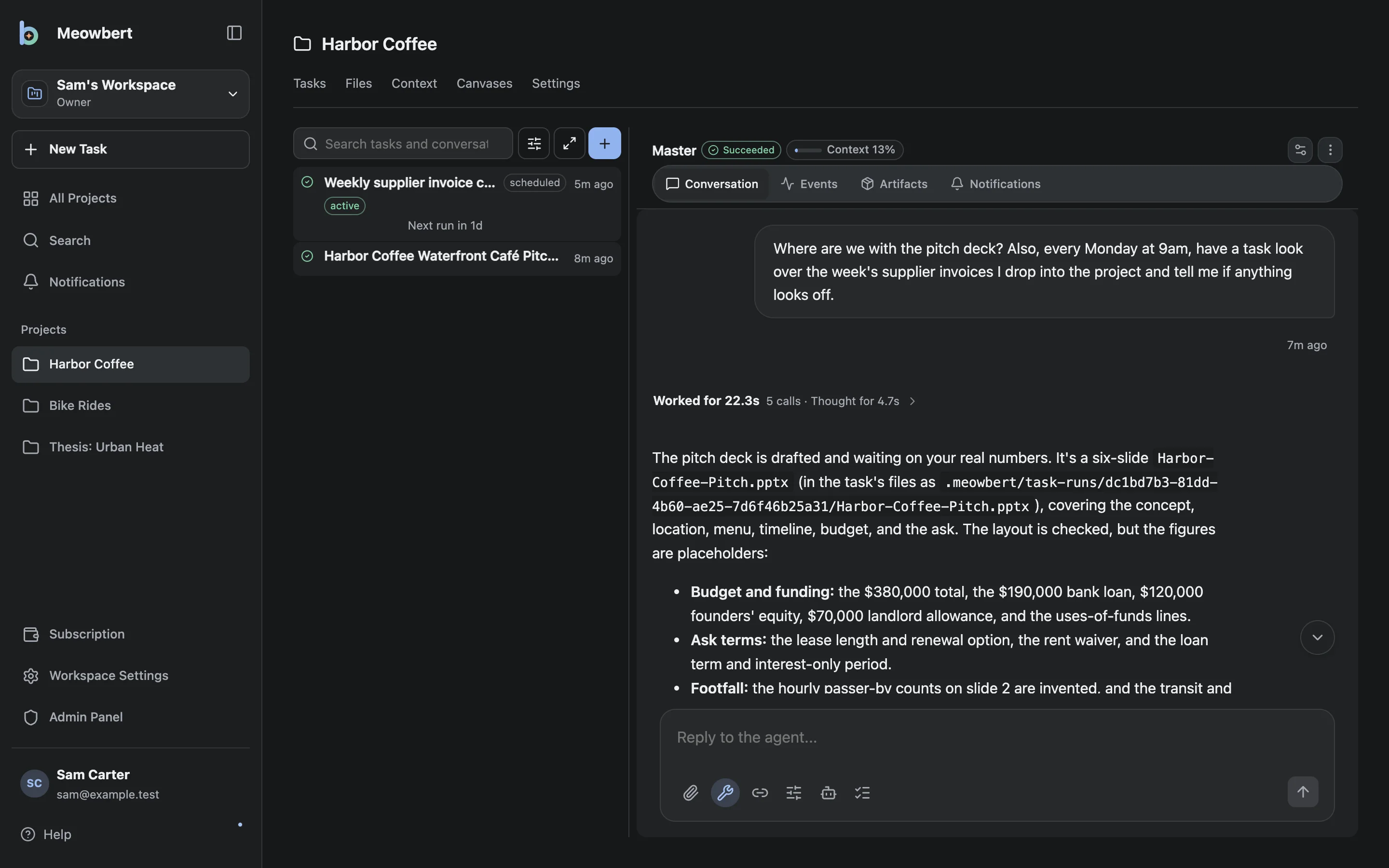
A project's Master reporting on the finished pitch deck and setting up a weekly supplier invoice check.
A project's Master reporting on a task and setting up a weekly invoice check.
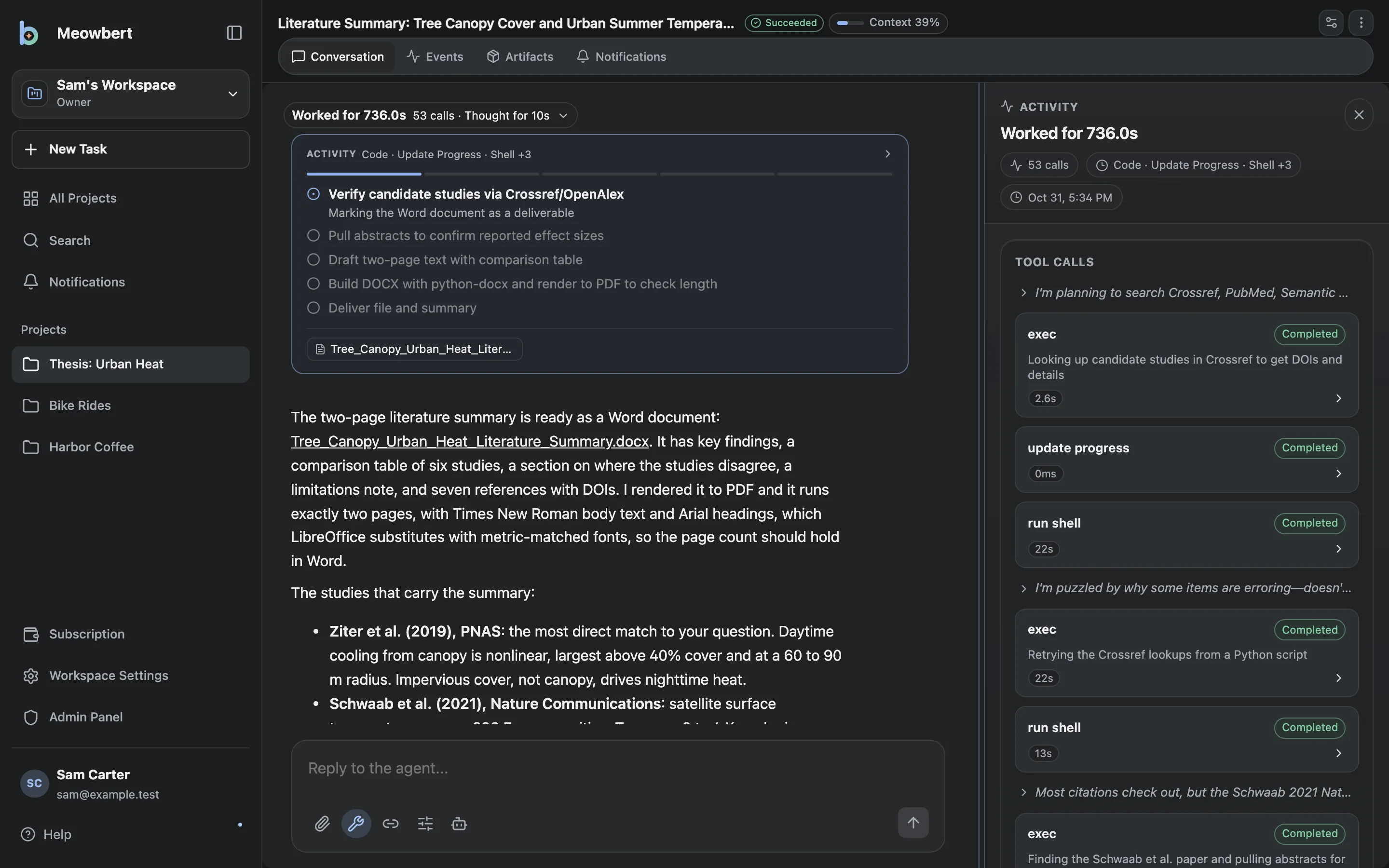
A research task with its activity panel open, showing the agent's plan and each tool call it made while building a Word document.
A task's activity panel, with the plan and every tool call the agent made.

Project Master

Every project has a Master agent. It turns your request into a brief, starts tasks, checks on them, and tells you when something is done or needs you.

A container per task

Each task gets a fresh container with a shell, git, Python, Node, a browser, and Office and PDF tools. Read-only system filesystem, no Linux capabilities, resource limits, optional gVisor.

Review before delivery

Long Horizon, Deep Research and Agent Swarm tasks go to a separate reviewer, and only finish once it approves. Quality control also opens the finished files to check how they look.

Projects

A project keeps its files, instructions, memory, and every task. Tasks don't expire: open one weeks later and send a follow-up, or branch it to try a different approach.

Scheduled and long tasks

Run a task on a cron schedule, loop it until you stop it, or give it a time budget. Queued and running work resumes after a server restart.

Teams

Shared workspaces with owner, admin, and member roles, per-person limits, and closed, approval, or open sign-ups.

Skills for everyday work

Agents come with a curated set of skills, so the result is a finished file you can use rather than text to paste somewhere. You can add your own by dropping a folder into skills/.

Canvas
Interactive pages that stay in the project: explainers, dashboards, prototypes, HTML slide decks and small apps. Agents keep editing them across tasks.
Word
Write and edit documents, fill templates, and export a matching PDF.
PowerPoint
Decks from templates, with built-in visuals, rendered so the agent can check every slide.
PDF reports
Reports, guides and handouts with automatic pagination, written in Typst.
Web research
Search, read sources in depth, and cite them.
Browser
Open pages, click through them, fill in forms, and pull out content.
Google Docs, Sheets and Slides
Edit files in a linked Drive folder directly.
Images
Generate or edit images and save them to the project.
Guided learning
Teach a topic step by step, with checks and interactive explanations.
Also included
ModelsAny provider with the OpenAI Responses API, including model servers on your own machine.
ConnectorsStart and continue tasks from Telegram, Discord, GitHub issues and pull requests, and email.
File syncGoogle Drive, OneDrive, pCloud, and any rclone remote, with conflict detection.
Desktop appsmacOS and Windows, with a quick-launch composer and computer use.
ShellsServers and REPLs that keep running between turns, with live output.
MobileInstall the web app on your phone with push notifications.

Current status

Meowbert started as a personal project in February 2026 and was developed privately for about seven months before its first public release. It's in daily use, and some parts are more finished than others.

Guarantees

  • The app, database, search index, and sandboxes all run on your hardware, with no telemetry.
  • Tasks and files are stored in your own Postgres database and on your own disk, and nothing expires.
  • The code is licensed under AGPL-3.0.

Known limitations

  • Model providers must support the OpenAI Responses API. Servers that only offer Chat Completions don't work yet.
  • Production use is only tested on Linux. Docker Desktop on macOS and Windows works for trying it out.
  • No sandbox is guaranteed escape-proof. Run Meowbert on a machine you're comfortable letting agents use.
All known limitations

Install

Clone the repository, run the setup script, and start the stack. The first account you create becomes the admin, and a setup wizard asks for your model provider.

Server
Linux, x86-64, 2 or more cores
Memory
4 GB minimum, 8 GB recommended
Software
Docker with Compose v2
Model
Any OpenAI Responses API provider
git clone https://github.com/XInTheDark/meowbert-ai-agent.git
cd meowbert-ai-agent
./scripts/setup.sh
docker compose up -d

Then open http://localhost:5173. The quickstart covers access from other devices, adding users, and backups.